
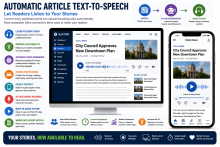
Let Readers Listen to Your Stories
Transform written articles into natural-sounding audio with a single click, making your journalism more accessible and convenient for every reader.
Not every reader has time to sit and read every story.
Some prefer listening while driving, walking, exercising, or working. Others rely on audio because of visual impairments or reading difficulties.
Surf New Media's Automatic Article Text-to-Speech feature instantly converts published articles into high-quality spoken audio, giving readers another way to experience your journalism—without requiring your newsroom to record anything manually.
Turn Every Story into Audio
Once an article is published, Surf CMS can automatically generate an audio version that readers can play directly from the article page…
Give your community a trusted place to find important local information. Surf CMS makes it easy to create dedicated resource pages that organize helpful content into permanent, easy-to-navigate sections.
Unlike daily news stories, resource pages remain available year-round and can be updated whenever information changes, making them valuable references for readers and excellent sources of ongoing website traffic.
Build Unlimited Resource Pages
Create resource pages for virtually any topic, including:
Community guides
School information
Local government contacts
Emergency resources
Business directories
Parks and recreation
Healthcare providers
Election information
Hurricane preparedness
Road construction updates
Public meeting schedules
Visitor guides
Local history…
Every section of your newspaper deserves its own destination. Surf CMS allows you to create attractive, customizable landing pages for every category of content, making it easier for readers to find the news that matters most to them.
Whether it's Local News, Sports, Opinion, Obituaries, Business, or Community Events, each section can have its own unique layout, featured stories, and branding.
Dedicated Pages for Every Section
Create landing pages for virtually any type of content, including:
Local News
Breaking News
Sports
Opinion
Editorials
Letters to the Editor
Obituaries
Community Events
Business
Schools
Public Safety
Government
Lifestyle
Entertainment
Photo Galleries
Videos
Classifieds
Special Publications
Each section becomes its own organized destination for…
Your homepage is your digital front page. Surf CMS gives you complete control over how your content is organized and displayed, allowing you to build a homepage that reflects your newspaper's brand, editorial priorities, and community.
Whether you prefer a traditional newspaper layout, a modern magazine-style design, or something entirely unique, Surf CMS provides the flexibility to create the homepage that works best for your readers.
Design Your Homepage Your Way
Build a homepage that fits your publication with customizable sections such as:
Top stories
Breaking news
Local news
Sports
Opinion
Business
Community events
Obituaries
Photo galleries
Videos
Sponsored content
Classifieds
Weather
E-edition links
Newsletter signup boxes
Arrange sections in virtually any order…
Today's readers expect a fast, beautiful website that works flawlessly on every device. Surf CMS is built with a responsive, mobile-first design that automatically adapts to desktops, laptops, tablets, and smartphones, giving every visitor the best possible reading experience.
Whether someone is reading the morning headlines on their phone, browsing sports scores on a tablet, or viewing your website on a large desktop monitor, your content is presented in a clean, professional layout.
Responsive on Every Device
Your website automatically adjusts to fit virtually any screen size, including:
Smartphones
Tablets
Laptops
Desktop computers
Large displays
There's no need to maintain a separate mobile website—Surf CMS delivers a single responsive experience across all devices.
Optimized…
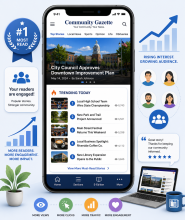
Help readers discover the stories everyone is talking about. Surf CMS can automatically display your most-read articles, giving visitors quick access to the most popular news, sports, opinion pieces, and community stories on your website.
By showcasing trending content, you increase page views, encourage longer visits, and help readers find stories they may have otherwise missed.
Automatically Updated
The Most-Read Stories feature updates automatically based on reader activity. As stories gain popularity, the list refreshes without requiring any manual work from your staff.
Display the most-read stories from:
Today
This week
This month
Custom time periods
Your most popular content is always front and center.
Place It Anywhere
Add a Most-Read Stories block to virtually any part…
Create High-Converting Landing Pages for Advertisers and Special Campaigns
Give advertisers a dedicated destination that turns clicks into customers.
A banner ad is only the beginning.
When readers click an advertisement, they should arrive at a page designed to inform, engage, and encourage action—not just a generic homepage.
Surf New Media’s Custom Landing Pages feature allows your newspaper to create professional landing pages for advertisers, community campaigns, special promotions, and sponsored content, giving businesses a more effective way to connect with your audience.
More Than a Banner Ad
Instead of sending readers to a website homepage, direct them to a page built specifically for a campaign.
Landing pages can include:
Business Information
Photo Galleries
Videos…
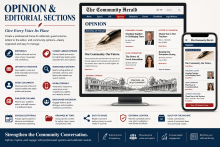
Give Every Voice Its Place
Create a professional home for editorials, guest columns, letters to the editor, and community opinions—all clearly organized and easy to manage.
Every community newspaper is more than a source of news.
It’s a place where ideas are shared, opinions are expressed, and community conversations take shape.
Surf New Media’s Opinion & Editorial Sections feature provides a dedicated area for editorials, opinion columns, guest contributors, and letters to the editor, making it easy for readers to distinguish opinion content from objective news reporting while giving your editorial team complete control over presentation and organization.
A Dedicated Opinion Section
Create a clearly defined section devoted to opinion content, including:
Editorials
Publisher…
Connect Related Stories and Help Readers Discover More Content
Automatically organize articles by people, places, organizations, events, and topics—creating dynamic pages that grow with every story you publish.
Every newspaper covers recurring topics.
City council meetings.
High school football.
Election coverage.
Local businesses.
Community festivals.
Instead of manually creating pages for each subject, Surf New Media’s Tags & Topic Pages feature automatically groups related articles together, creating living topic pages that expand as new stories are published.
It’s one of the easiest ways to improve reader engagement, strengthen SEO, and make your website easier to explore.
What Are Tags?
Tags are keywords assigned to articles that describe important people, places,…
Organize Your News. Simplify Navigation. Improve the Reader Experience.
Create a well-organized newspaper website that helps readers quickly find the stories that matter most.
Every community newspaper covers a wide variety of topics—from local government and high school sports to community events and business news.
Surf New Media’s Categories & Sections feature helps organize your content into clear, easy-to-navigate sections, making it simple for readers to discover the news they’re looking for while giving editors complete control over how stories are organized.
A well-structured website isn’t just easier to navigate—it keeps readers engaged and encourages them to explore more content.
Organize Content Your Way
Every newspaper is unique.
Create categories and sections that…