
The Trash Bin provides an added layer of protection against accidental deletions by allowing deleted content to be recovered before it is permanently removed from your website.
Instead of being immediately deleted, articles, pages, and other supported content types are first moved to the Trash Bin, where they can be restored if needed.
Why Use the Trash Bin?
Mistakes happen. An article may be deleted accidentally, the wrong page may be removed, or content may need to be recovered after a misunderstanding.
The Trash Bin helps protect your website by allowing administrators to restore deleted content quickly and easily.
Deleting Content
When you delete an article, page, or other supported content, it is moved to the Trash Bin instead of being permanently erased.
This allows you to…
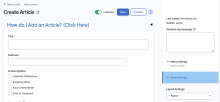
Publishing content with Surf CMS is quick and easy. Once you've created your first article, the process will become second nature.
Step 1: Log In
Log in to your website using your administrator, editor, or publisher username and password.
After logging in, you'll see the administrative toolbar across the top of the website. Click Shortcuts to access the most commonly used content management tools, including the option to create a new article.
Step 2: Create Your Article
Complete as many of the following fields as needed:
Headline – Enter the title of your article.
Subhead (Optional) – Add a secondary headline if desired.
Article Options (Optional) – Depending on your website's configuration, you may see options such as:
Featured (Slideshow): Display the article in the homepage…