
Depending on your workflow, advertiser self-service options can be configured.
Yes. You can publish immediately or schedule stories to appear at any date and time.
Yes. Multiple users can create, edit, review, and publish content simultaneously. Each user can have customized permissions based on their role.
Yes. Articles include social sharing options, making it easy for readers to share your content across major platforms.
Yes. Every newspaper has its own identity, and we’ll customize your website to reflect your publication’s brand.
To ensure a consistent user experience, reliable performance, and easier long-term support, all Surf New Media websites are built using one of our professionally designed website templates. We currently offer three modern newspaper layouts, each designed specifically for community newspapers.
While the overall structure and functionality remain consistent, we’ll customize the design to match your publication by incorporating your:
- Newspaper logo
- Brand colors
- Typography
- Header and navigation styling
- Flag or nameplate design
- Homepage sections
- Featured content areas
- Advertising placements
This approach gives you a website that looks and feels like your newspaper while benefiting from a proven design that’s optimized for readers, mobile devices, search engines, and future updates.
Our template-based approach also allows us to launch websites more quickly, keep costs lower, and deliver new features and improvements to all clients without requiring a complete redesign.
Yes. We can configure a paywall based on your publication’s business model and subscription strategy.
Yes. Most newspapers keep their existing domain name. We simply point it to your new website when it’s time to launch.
Yes. Our platform includes advertising tools that make it easy to manage display ads and sponsored content.
Of course! We’d be happy to schedule a live demonstration tailored to your newspaper. We’ll show you how the platform works, answer your questions, and explain how we can simplify your digital publishing workflow.
Absolutely. We can import subscriber information from spreadsheets or compatible systems, helping reduce manual work during your transition.
Yes. We can migrate articles, photos, categories, pages, menus, and other content from most newspaper websites. Every migration is evaluated individually to determine the best approach.
Yes. Articles can be selected and assembled into professional newsletters in minutes, eliminating the need to copy and paste content manually.
Absolutely. Your content belongs to you. We help manage and publish it, but ownership remains with your newspaper.
Yes. Our platform scales from small weekly publications to larger daily newspapers and regional news organizations.
Yes. We provide training for editors, reporters, publishers, advertising, and anyone else who will use the system.
Yes. Many of our clients are weekly community newspapers, and our platform is designed specifically with their needs in mind.
Yes. Our platform includes e-edition support, making it easy for subscribers to access digital versions of your newspaper.
Absolutely. Articles can be published immediately or scheduled for future publication. Updates appear instantly on your website.
Yes. Built-in AI tools can help generate headlines, summaries, social media posts, newsletter introductions, SEO descriptions, and more—saving valuable newsroom time while keeping editors in control.
Yes. We offer digital subscription capabilities, allowing publishers to manage subscriber-only content and online access.
Most users become comfortable with the system after a short training session. The interface is designed to make publishing fast and intuitive.
How to Add a New User with a Role and Expiration in the Surf New Media CMS System
-
Log in to the website as an administrator.
-
In the admin menu, go to:
People or in the Shortcuts menu, go to Manage Users
-
Click:
Add user
-
Fill in the user information:
-
Email address
-
Username
-
Password
-
-
Under Roles, check the role you want to give the user.
Example:
-
Subscriber
-
Publisher
-
-
Look for the Role Expiration section on the user form (It will pop open once the role is checked in #5 above.
-
Set the expiration date for the role.
This is the date when the user should automatically lose that role.
-
Click:
Create new account
That’s it. The user will have access based on the role until the expiration date.
 To add content to your CMS site, you first need to login with your administration or publisher username and password.
Once logged in, you will have a black and gray navigation menu running accross the top of the website. Click the link reading "shortcuts" and will be shown a list of options available to you for adding content.
 The basics of adding content (such an article to the site) are outlined below:
- Add in the title to the article. <-- This is the headline of the article
- (Optional) Add in a subhead
- (Optional) Choose article options
- Featured (Slideshow): Will add this article to the front page main slideshow area
- Breaking News: Will add the article to the breaking news area of the site
- Add to Newsletter: Will queue this article to be sent out in the next newsletter
- Post to Facebook: Will automatically post this article to your Facebook page
- Choose the category or section this article should be in. Multiple sections can be chosen
- (Optional) Add in a byline for the article
- Type or paste in the article text in the body
- (Optional) Add in a main image using the file upload field
- (Optional) In addition to the main image, you can upload multiple photos to the photo gallery for the article
- (Optional) You can add a PDF to the article using the PDF upload field
When all elements are added, you can click on the "Save" button in the upper right of the page. The article will be added, categorized and image resized as needed automatically.
Additional Options
In the right sidebar, you will see various vertical tabs to help with content management. Please explore the various options for AI clean up of the article, scheduling options and paywall (premium content) options.
Most newspaper websites are launched in 4 to 8 weeks, depending on the size of your website, archives, and any custom features. We provide a detailed project timeline before work begins and keep you informed throughout the process.
Your New Website Is Closer Than You Think
One of the biggest concerns publishers have is, “How long will it take to launch our new website?”
The good news is that we’ve refined our migration process over many years. While every newspaper is unique, most websites can be launched in 4 to 8 weeks after we receive the content and begin the project.
Week 1: Discovery & Planning
We start by learning about your newspaper and current workflow.
- Review your current website
- Discuss your goals and priorities
- Plan your site structure
- Set up your hosting environment
- Schedule the migration
Milestone: Project kickoff completed.
Week 2: Website Build & Migration
Our team begins building your new website and transferring content.
- Articles and archives
- Categories and sections
- Photos and media
- Menus
- Advertisers
- Subscriber information, if applicable
We also configure your newsroom workflow and user accounts.
Milestone: A working preview site is ready.
Week 3: Design Review & Training
Now it’s your turn to explore the new site.
- A private preview website
- Training sessions for your staff
- Time to review the layout and features
- Opportunities to request adjustments
We’ll make refinements based on your feedback so the site matches your vision.
Milestone: Staff is trained and comfortable using the new CMS.
Week 4: Final Testing & Launch
Before launch, we perform a final review to ensure everything is ready.
- Testing links and navigation
- Mobile and tablet compatibility
- Performance optimization
- Search engine setup
- Security review
- Email and domain updates, if needed
Once everything is approved, we schedule the launch at a time that works best for your newsroom.
Milestone: Your new website is live!
After Launch
Our relationship doesn’t end when your website goes live.
- Technical support
- Software updates
- Security monitoring
- Ongoing training
- Feature enhancements
- Help whenever you need it
Our goal is to become your long-term digital partner—not just your website provider.
Every Newspaper Is Different
Some websites can be launched in just a few weeks, while larger newspapers with extensive archives, custom features, or complex subscription systems may require additional time.
Before we begin, we’ll provide a clear project plan and timeline so you know exactly what to expect.
Average Launch Timeline
| Phase | Typical Time |
|---|---|
| Discovery & Planning | 3–5 days |
| Website Build & Migration | 1–3 weeks |
| Review & Staff Training | 1 week |
| Testing & Launch | 2–5 days |
| Typical Total | 4–8 weeks |
Worried about downtime?
Your existing website remains online throughout the migration process. We build and test your new website in a private staging environment, then switch over only after you’ve approved everything.
That means your readers continue to have uninterrupted access to your news while we prepare your new site behind the scenes.
Yes. Our packages include reliable hosting, security monitoring, automatic updates, backups, and ongoing maintenance.
Yes. Security is a top priority. We monitor updates, apply security patches, perform backups, and use Drupal’s enterprise-grade security foundation.
- Hits:
- Any request made to the server which is logged, is considered a 'hit'. The requests can be for anything... html pages, graphic images, audio files, CGI scripts, etc... Each valid line in the server log is counted as a hit. This number represents the total number of requests that were made to the server during the specified report period.
- Files:
- Some requests made to the server require that the server then send something back, such as a html page or graphic image. When this happens, it is considered a 'file'. The relationship between 'hits' and 'files' can be thought of as 'incoming requests' and 'outgoing responses'.
- Pages:
- Pages are, well, pages! Generally, any HTML document, or anything that generates an HTML document, would be considered a page. This does not include the other stuff that goes into a document, such as graphic images, audio clips, etc... This number represents the number of 'pages' requested only, and does not include the other 'stuff' that is in the page. What actually constitutes a 'page' can vary from server to server.
- Sites:
- Each request made to the server comes from a unique 'site', which can be referenced by a name or ultimately, an IP address. The 'sites' number shows how many unique IP addresses made requests to the server during the reporting time period.
- Visits:
- Whenever a request is made to the server from a given IP address (site), the amount of time since a previous request by the address is calculated. If the time difference is greater than a pre-configured 'visit timeout' value, it is considered a 'new visit', and this total is incremented. The default timeout value is 30 minutes, so if a user visits your site at 1:00 in the afternoon, and then returns at 3:00, two visits would be registered.
Due to the limitation of the HTTP protocol, log rotations and other factors, this number should not be taken as absolutely accurate, rather, it should be considered a pretty close "guess". - KBytes:
- The KBytes (kilobytes) value shows the amount of data, in KB, that was sent out by the server during the specified reporting period. This value is generated directly from the log file, so it is up to the web server to produce accurate numbers in the logs.
In general, this should be a fairly accurate representation of the amount of outgoing traffic the server had, regardless of the web servers reporting quirks. - Note: A kilobyte is 1024 bytes, not 1000
- Top Entry and Exit Pages:
- The Top Entry and Exit tables give a rough estimate of what URL's are used to enter your site, and what the last pages viewed are.
Because of limitations in the HTTP protocol, log rotations, etc... this number should be considered a good "rough guess" of the actual numbers, however will give a good indication of the overall trend in where users come into, and exit, your site. - Referers:
- Referrers are those URLs that lead a user to your site or caused the browser to request something from your server. The vast majority of requests are made from your own URLs, since most HTML pages contain links to other objects such as graphics files.
Typical referers would be: a webpage linking to your site; a search engine results page; or another site including one of your images in their content. - Any request made to the server which is logged, is considered a 'hit'. The requests can be for anything... html pages, graphic images, audio files, CGI scripts, etc... Each valid line in the server log is counted as a hit. This number represents the total number of requests that were made to the server during the specified report period.
You’ll receive support from people who understand newspapers—not a generic call center. Whether you have a technical question or need help publishing content, we’re here to help.
That’s perfectly fine. We specialize in helping newspapers upgrade from older websites and CMS platforms with minimal disruption.
The internet relies on thousands of DNS servers around the world. These servers act like address books that tell browsers where a website lives.
When a change is made:
-
The domain’s authoritative DNS server is updated first.
-
Internet providers and DNS servers around the world gradually refresh their cached records.
-
As each server updates, users in those locations begin seeing the new site.
Because every provider refreshes its cache at different times, some people may see the old website while others already see the new one.
How Long It Takes
Most DNS changes complete within a few minutes to a few hours, but it can take up to 24–48 hours for every network worldwide to update.
What Clients May Notice
During propagation, it’s normal to see things like:
-
The website working for some people but not others
-
Email briefly routing to the old server
-
The site appearing to “switch” between old and new versions
This is temporary and resolves automatically as the DNS records update globally.
Simple Analogy
Think of DNS like updating a phone number in phone books around the world.
Even after you change the number, it takes time for every phone book to print the new one.
Publish Everywhere allows you to publish content once and distribute it across multiple channels, including your website, newsletters, social media, RSS feeds, and more—reducing repetitive work.
The Surf CMS supports a wide variety of payment processors. The most robust and widely used options include:
- Stripe: Supports credit cards, mobile wallets (Apple Pay, Google Pay), and various bank transfers.
- PayPal: Supports off-site Express Checkout and on-site payments via PayPal Payments Pro.
- Authorize.Net: Supports on-site credit card processing and Card-on-File capabilities.
- Braintree: Offers tokenization and on-site processing.
- Square: API integration for online transactions.
- Regional/International: Processors like Razorpay, Mollie, Iyzico, and ECOMMPAY.
For more information or to see if a particular payment processor is supported, please email support@surfnewmedia.com
Drupal provides stronger security, better user permissions, greater flexibility, and superior scalability for organizations that publish large amounts of content. It allows us to build a platform specifically designed for professional newspaper operations.
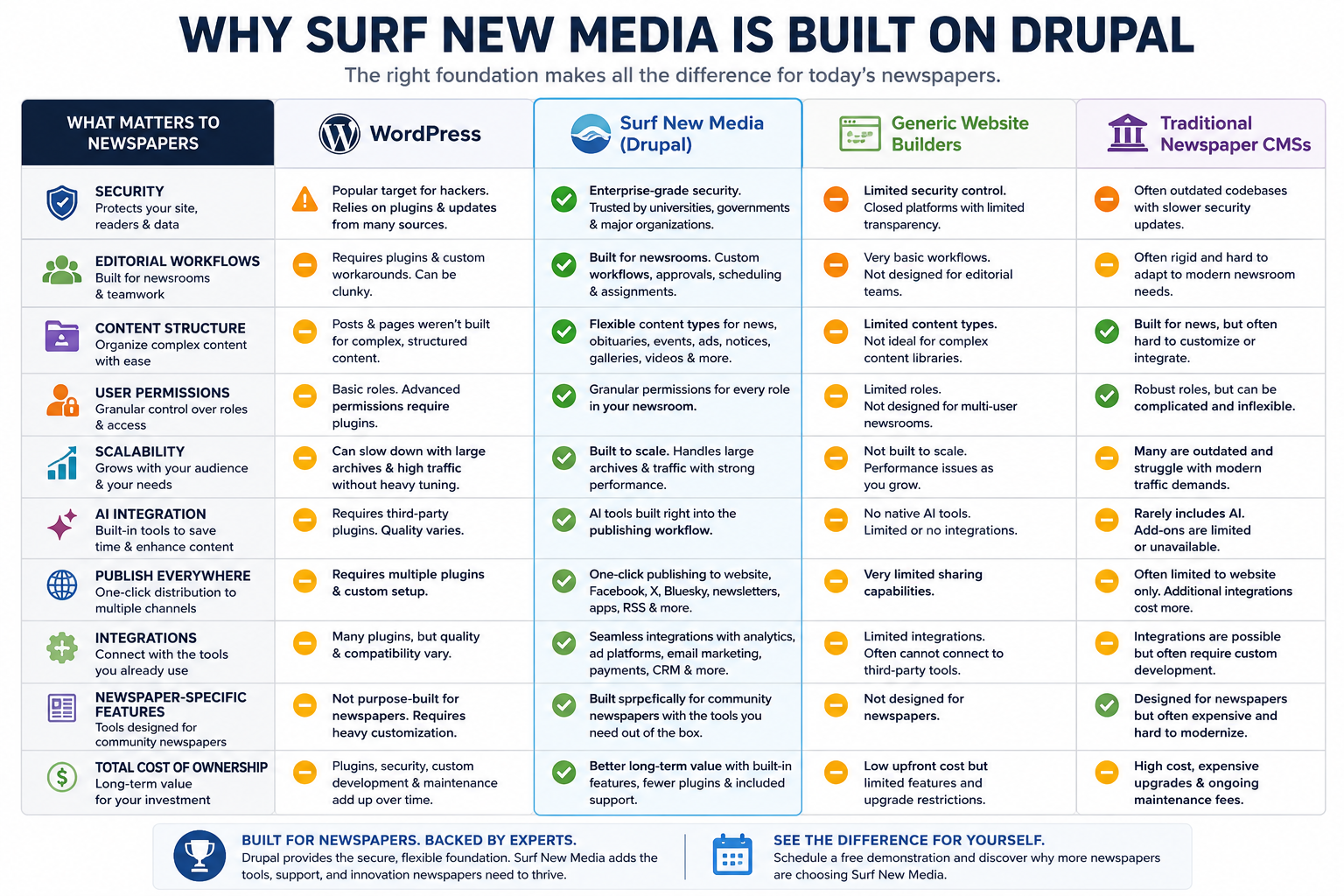
Built for Serious Publishing
At Surf New Media, one of the questions we hear most often is:
“Why did you choose Drupal instead of WordPress?”
The answer is simple.
Our platform wasn’t built for blogging—it was built for newspapers.
Community newspapers have unique requirements that go far beyond publishing articles. Managing reporters, editors, photographers, advertisers, subscriptions, newsletters, breaking news, and digital archives requires a content management system that is secure, flexible, and built to scale.
That’s why Surf New Media is powered by Drupal.
Enterprise-Level Security
Newspapers are trusted sources of information, making them attractive targets for hackers.
Drupal is trusted by organizations that demand high levels of security, including government agencies, universities, healthcare organizations, and major corporations.
Because security is built into Drupal’s development process, it provides a strong foundation for protecting your website, subscriber information, and newsroom.
With Surf New Media, we also monitor updates, apply security patches, and help keep your site running safely.
Built for Large Content Libraries
Most newspapers don’t publish just a few pages.
They publish:
- Thousands of articles
- Decades of archives
- Photo galleries
- Videos
- Obituaries
- Legal notices
- Classifieds
- Advertiser content
- Community calendars
Drupal is designed to organize and manage large amounts of structured content efficiently, making it easier to search, categorize, and present information.
Powerful User Permissions
A newspaper isn’t managed by one person.
Different people need different levels of access.
For example:
- Reporters
- Editors
- Publishers
- Advertising staff
- Designers
- Freelance writers
- Interns
- Guest contributors
Drupal allows detailed control over who can create, edit, publish, approve, or manage different parts of your website.
This makes newsroom workflows much easier to manage.
Flexible Content Types
Every newspaper publishes different kinds of content.
Instead of forcing everything into a blog post, Drupal lets us build custom content types such as:
- News
- Sports
- Opinion
- Obituaries
- Public Notices
- Business Directory Listings
- Events
- Photo Galleries
- Videos
- Classified Ads
- Special Sections
Each content type can have its own fields, layouts, workflows, and publishing rules.
Designed to Grow
Many newspapers begin with a simple website.
Later they may want to add:
- Digital subscriptions
- Paywalls
- E-editions
- Mobile apps
- AI tools
- Newsletters
- Advertising systems
- Community calendars
- Job boards
- Event registration
- Podcasts
- Streaming video
Drupal grows with your organization without requiring you to rebuild your entire website.
Better Workflow Management
Publishing news often involves multiple people.
A reporter writes the story.
An editor reviews it.
Photos are added.
Headlines are adjusted.
The article is scheduled.
The newsletter is prepared.
Social media is updated.
Drupal supports editorial workflows that help teams work together efficiently.
Excellent Search Engine Optimization
Search engines reward websites that are fast, well-structured, and properly organized.
Drupal provides excellent technical SEO capabilities, including:
- Clean URLs
- Structured metadata
- Schema support
- XML sitemaps
- Canonical URLs
- Redirect management
- Fast page generation
- Mobile optimization
Combined with Surf New Media’s publishing tools, your content is positioned to reach readers more effectively.
AI Integration
Artificial intelligence is changing the way newsrooms work.
Because Drupal is highly customizable, we’ve integrated AI tools directly into our publishing workflow.
Editors can quickly generate:
- Headlines
- Story summaries
- Social media posts
- Newsletter introductions
- SEO descriptions
- Advertising copy
- Image suggestions
These tools are designed to save time while keeping journalists in control of the final content.
Publish Everywhere
Publishing should happen once—not five separate times.
With Surf New Media’s Publish Everywhere technology, content can be distributed to:
- Your website
- X
- Bluesky
- Newsletters
- Mobile apps
- News aggregators
- RSS feeds
Drupal’s flexible architecture makes this streamlined publishing workflow possible.
Reliable Performance
Fast websites improve reader satisfaction and support advertising performance.
Drupal is designed to deliver strong performance for both small community newspapers and larger organizations with significant traffic, especially when paired with modern hosting and caching.
Easy Integration
Many newspapers rely on a mix of digital tools.
Drupal integrates well with services such as:
- Google Analytics
- Google Tag Manager
- Google Ad Manager
- Email marketing platforms
- Payment gateways
- CRM systems
- Advertising tools
- Social media platforms
This flexibility helps your website fit into your existing workflow.
Open Source Means Freedom
Drupal is open-source software.
That means there are no licensing fees simply to use the platform itself, and it benefits from contributions by a large global community of developers.
For Surf New Media clients, that translates into a modern, continuously improving foundation without being tied to a proprietary CMS vendor.
Why Not WordPress?
WordPress is an excellent platform for many types of websites, including blogs, marketing sites, and small business websites.
However, newspapers often have more demanding requirements, including:
- Complex editorial workflows
- Multiple user roles
- Structured content
- Large archives
- Subscription management
- Advanced permissions
- Custom publishing tools
- Deep integrations
- Scalable architecture
Those are the types of challenges Drupal was designed to handle.
Rather than trying to adapt a general-purpose publishing platform, we chose a foundation that better matches the needs of professional news organizations.
Why Surf New Media?
Drupal is the foundation—but it’s only part of the solution.
Surf New Media builds on Drupal with features created specifically for community newspapers, including:
- AI-powered newsroom tools
- Publish Everywhere technology
- Newsletter automation
- E-edition integration
- Digital subscriptions and paywalls
- Advertising tools
- Website hosting and maintenance
- Security monitoring and updates
- Migration assistance
- Training and responsive support
The result is a publishing platform that helps newspapers work more efficiently, reach more readers, and adapt as the industry evolves.
Ready to See It in Action?
Whether you’re evaluating your first CMS or considering a switch from your current platform, we’d be happy to show you how Surf New Media can simplify your newsroom’s digital publishing workflow.
Schedule a free demonstration today and discover why more newspapers are choosing a platform built on Drupal.
Because we’re more than a software provider—we’re a partner that understands community newspapers. Our platform combines powerful technology with responsive support from people who know how newsrooms operate. From AI-powered publishing tools and digital subscriptions to newsletters, e-editions, and our Publish Everywhere technology, we’ve built a solution designed specifically to help newspapers work smarter, serve readers better, and grow their digital presence.
Yes. Your existing website remains live while we build your new site in a private staging environment. We only switch to the new website after everything has been tested and approved.
Yes. Every website includes SEO-friendly features such as clean URLs, meta tags, XML sitemaps, structured data, and fast page loading.
Yes. Every Surf New Media website is fully responsive and designed to provide an excellent experience on desktops, tablets, and smartphones.
Yes. TideCast Connect is our integration framework. It already supports major newspaper circulation systems, payment processors, analytics platforms, social networks, and we're continually adding new connectors.