
Managing readers, subscribers, staff members, and administrators should be simple—not a daily challenge. Surf CMS includes a powerful user management system that gives publishers complete control over who can access content and what they can do throughout the website.
Every user account can be assigned one or more roles, making it easy to manage digital subscribers, print subscribers, staff writers, editors, photographers, advertisers, moderators, and administrators. Whether you’re operating a single publication or managing multiple newspapers, roles can be customized to match your organization’s workflow.
For publications using a paywall or membership model, subscriber roles can automatically determine which content readers can access. This allows publishers to offer digital-only…
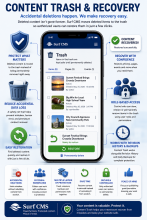
Mistakes happen. An article is deleted accidentally, a page is removed too soon, or an editor realizes something still needs to be recovered. With the Content Trash feature, deleted content isn't immediately lost—it can be safely restored when needed.
Instead of permanently removing content with a single click, Surf CMS provides an additional layer of protection that helps prevent accidental data loss and gives your newsroom greater peace of mind.
Recover Deleted Content
When supported content is deleted, it is moved to a secure trash area rather than being permanently removed immediately.
Editors can recover items such as:
News articles
Sports stories
Opinion columns
Resource pages
Event pages
Landing pages
Basic pages
And other supported content types
If something is deleted…
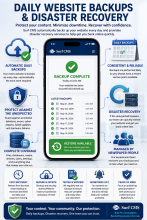
Your newspaper’s website is one of its most valuable assets. Every article, photo, advertisement, and page represents years of work that deserves to be protected. Surf CMS includes daily website backups and disaster recovery services designed to help safeguard your content and minimize downtime if the unexpected happens.
From accidental deletions to hardware failures or security incidents, regular backups provide an added layer of protection so your publication can recover quickly and continue serving its community.
Automatic Daily Backups
Your website is backed up automatically on a regular schedule, helping protect:
News articles
Photos and videos
User accounts
Media library
Pages and resources
Menus
Website settings
Databases
Advertising content
Subscription information…
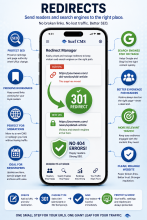
Websites change over time. Articles move, section names evolve, and entire websites are redesigned. Surf CMS makes it easy to create and manage URL redirects so readers—and search engines—always end up in the right place.
Whether you're migrating from another CMS, renaming a section, or replacing an outdated page, redirects help preserve traffic, improve the reader experience, and protect your search engine rankings.
Prevent Broken Links
Instead of showing visitors a "Page Not Found" error, redirects automatically send them to the most relevant page.
Common uses include:
Website redesigns
CMS migrations
Renamed articles
Updated section URLs
Moved landing pages
Reorganized content
Deleted pages
Special publication archives
Your readers reach the right destination without…
Navigation should help readers find your content—not overwhelm them. Surf CMS makes it easy to build, organize, and manage your website's menus while giving you complete control over how readers navigate your newspaper.
Whether you're updating your main navigation, adding a special section, or creating a temporary menu for election coverage or a community event, menu management is fast and flexible.
Easy-to-Manage Navigation
Create and organize menus for:
Main navigation
Footer menus
Section menus
Utility menus
Special publication menus
Landing pages
Seasonal promotions
Sponsored sections
Update menus in just a few clicks—no programming required.
Drag-and-Drop Organization
Rearrange menu items with an intuitive drag-and-drop interface.
Quickly:
Reorder links
Create…
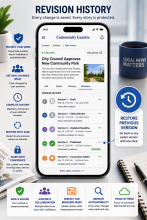
Every story evolves. Headlines change, facts are updated, corrections are made, and editors refine articles before publication. Surf CMS automatically saves previous versions of your content, allowing your newsroom to review changes, restore earlier versions, and maintain a complete editorial history.
Whether you're correcting a typo or recovering from an accidental edit, Revision History gives you confidence that your work is never lost.
Automatic Version Tracking
Every time an article is saved, Surf CMS can create a new revision automatically.
Track changes to:
News articles
Sports stories
Opinion columns
Obituaries
Event pages
Resource pages
Static pages
Photo galleries
Landing pages
And more
Your editorial history is preserved as your content evolves.
See What Changed…

Every newspaper has its own publishing process. Surf CMS helps your newsroom work more efficiently by providing flexible editorial workflows that guide stories from the first draft to final publication.
Whether your publication has a single editor or multiple departments reviewing every story, Surf CMS gives you complete control over how content moves through your newsroom.
Build a Workflow That Fits Your Newsroom
No two newspapers operate exactly alike. Surf CMS allows you to create editorial workflows that match your organization's policies and approval process.
A typical workflow might include:
Draft
In Review
Copy Editing
Fact Checking
Ready for Approval
Approved
Scheduled
Published
Archived
You can customize workflow stages to fit your publication's needs.
Role-Based…
Not everyone in your organization needs access to everything. Surf CMS includes a powerful role-based permissions system that lets you control exactly what each user can see, edit, publish, and manage.
Whether you have two staff members or hundreds of employees, freelancers, contributors, and volunteers, Surf CMS helps ensure everyone has access to the tools they need—and nothing they don't.
Create Unlimited User Roles
Build roles that match the way your newspaper operates, including:
Publishers
Editors
Managing Editors
Reporters
Sports Editors
Opinion Editors
Copy Editors
Photographers
Advertising Representatives
Advertising Managers
Circulation Staff
Customer Service
Web Administrators
Designers
Freelance Contributors
Columnists
Interns
Community Contributors…

Every second counts. Readers expect websites to load quickly, whether they're checking breaking news on their phone, reading an in-depth feature, or browsing the latest sports scores. Surf CMS is built with performance in mind, helping your newspaper deliver fast-loading pages that keep readers engaged.
A faster website doesn't just improve the user experience—it can also support better search engine rankings, lower bounce rates, and higher reader satisfaction.
Built for Performance
Surf CMS is designed to deliver content efficiently using modern web technologies and performance best practices.
Performance features include:
Optimized page rendering
Responsive image delivery
Browser caching support
Efficient CSS and JavaScript loading
Compressed assets
Optimized database queries…
Publishing great journalism is only half the battle—people have to be able to find it. Surf CMS is built with search engine optimization (SEO) in mind, helping your stories, photos, videos, and resource pages rank higher in search results and reach more readers.
From technical SEO to content optimization, Surf CMS provides the tools newspapers need to improve visibility, attract new audiences, and increase long-term traffic.
Built for Search Engines
Surf CMS includes a wide range of SEO-friendly features, including:
Search engine-friendly URLs
Custom page titles
Meta descriptions
Meta keywords (optional)
Canonical URLs
XML sitemaps
Robots.txt support
Structured page hierarchy
Breadcrumb navigation
Clean HTML markup
Fast page loading
Mobile-friendly design
Secure HTTPS…